Project · 2026
Jimaku Catcher
Turn subtitle clutter into a learning decision—without stopping the show.
Jimaku Catcher is a working Mac prototype for capturing unfamiliar Japanese vocabulary from television subtitles without interrupting viewing. Claude extracts candidate words from screenshots; I decide what becomes “Learning,” what is already “Known,” and what remains undecided.
I defined the product, interaction model, and human–AI boundaries, then directed Claude Code to implement and refine the local workflow with the Anthropic API and Airtable. I later added a dictionary-backed verification layer to prevent plausible model errors from becoming trusted study material.
Product strategy, interaction design, AI workflow design, and directed implementation with Claude Code
Built July 1–13, 2026 · in continuous personal use since — 6 weeks and counting
Testing while watching Japanese TV, reviewing captures, and inspecting saved vocabulary
A capture-to-review tool in ongoing personal use: 452+ screenshots processed into 3,231 distinct vocabulary candidates
Context
One does not simply learn Japanese
After a year of studying Japanese 5 days a week as a college freshman, I traveled to Japan for the first time to study the language in situ. I turned on the TV in my dorm in Tokyo and was completely overwhelmed. I could hardly understand what people were saying — and even though Japanese captions covered the screen, especially on variety shows, I still had no practical way to capture the words I didn’t know.
Over the years, my Japanese improved, but watching TV still meant encountering words I wanted to save: pausing the show, taking a photo of the screen, or hastily trying to copy down unfamiliar characters before they disappeared. There was never a low-friction way to turn those moments into something I could learn from.
How it works
Catch unknown words without pausing the show
The workflow shifts from stopping to look things up → capturing everything as it appears and reviewing it afterward.
- Notice an unfamiliar word
- Pause the show before it disappears
- Take a photo of the screen
- Run the image through Google Translate
- Look up/save the useful words manually
- Resume watching
- Capture — Press a keyboard shortcut. The show keeps playing.
- Extract — Claude reads the screenshot and identifies vocabulary candidates.
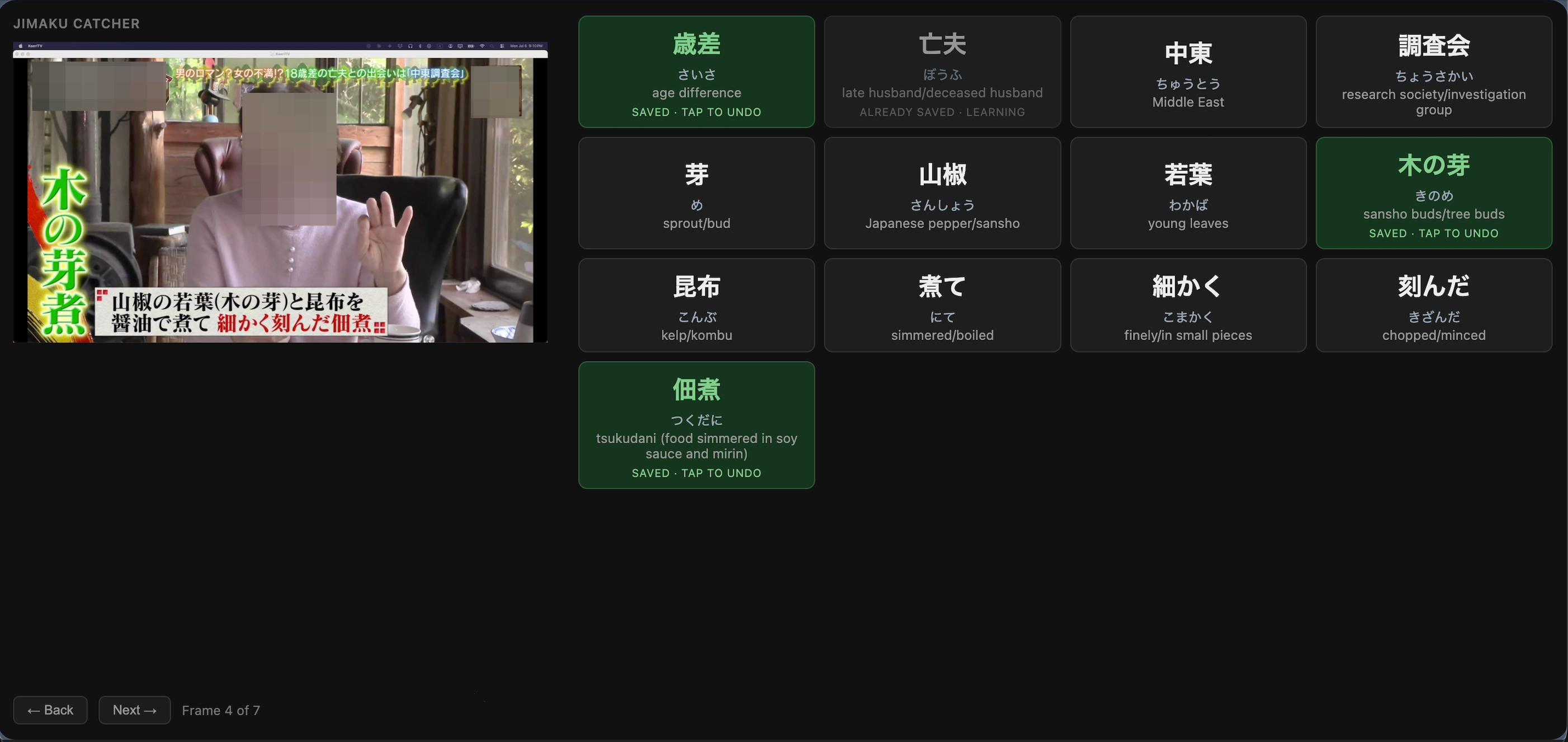
- Review — Screenshots and vocabulary cards appear frame-by-frame in my browser.
- Decide — I choose what is worth saving.
- Save — Selected words are added to Airtable as my learning backlog.
Jimaku Catcher works from screenshots, so streaming services with Digital Rights Management (DRM) protection return blank images. Sentence Map, a related project I made to study Korean, had to work around that constraint from the start: every service I use for Korean is DRM-protected, so the only route in is to pause the show and photograph the screen.
Building the first version
Claude reads the screen; everything else is my call
Claude’s role was deliberately narrow: read an image, identify vocabulary candidates, and return words with readings and meanings. The interaction model determined what persisted. I kept the learner, not the model, responsible for deciding what was worth studying and what was already known.
Automatically filter vocabulary by estimated difficulty and only show words likely to be useful.
Difficulty is personal. After 20 years of studying Japanese, the word that stops me is rarely predictable: I might already know a “hard” word I’ve seen hundreds of times, but miss a specific food term, name, or expression that changes the meaning of a scene.
Claude shows candidates. I decide what matters.
Send every extracted word to Airtable so I could organize them later.
Saving everything just moves the cleanup work somewhere else. On a typical screenshot, most words are things I already know. The useful action is the moment of recognition: “this is the one I want to remember.” IPA Drill, an earlier project of mine, follows the same principle: the system can assist, but I confirm what I know and don’t know—not AI.
Only intentional taps become saved vocabulary.
The first working version made one durable distinction: a word was either intentionally saved to Learning or left undecided with no Airtable record.
- Learning
- Saved to Airtable
- Undecided
- No Airtable record
Iterating on the design
What changed once I started using it
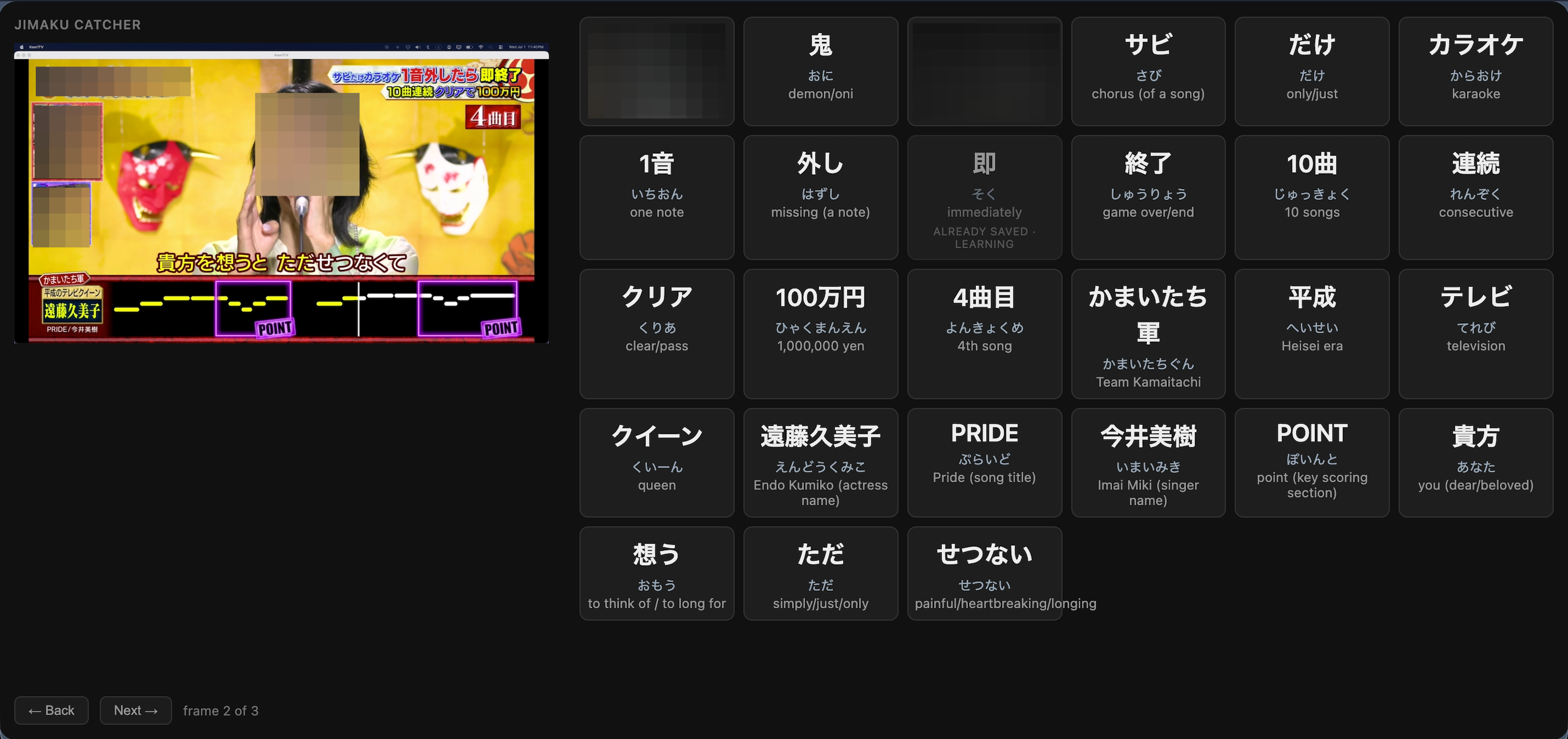
After using the first version, I noticed another problem: screenshots with lots of text generated long stacks of vocabulary cards. Many were words I already knew, but because the system had no concept of “known,” they kept appearing again and again, adding visual noise and pushing useful words farther down the page.
I needed a third state: not saved, not undecided, but already known. Instead of adding another button or cycling through states, I matched the interaction to the intent: if I already knew a word, I wanted to get it out of my way.
Dragging a card off screen marks the word as Known in Airtable, filtering it out of future results — even when that word appears again in another screenshot.
Airtable deliberately stores only the two persistent states: Learning and Known. Undecided remains a review choice, not a third backlog column or another piece of list management.
- Learning
- Save for learning
- Mark as “Known”
- Teach the system I know this already
- Undecided
- No Airtable record
Known has become the dominant explicit decision: 1,472 words dismissed as already familiar against 760 saved to Learning — still roughly two Known classifications for every Learning one. The state wasn’t sized in advance; it was added after repeated familiar words created noise, and real use is what revealed how much work it would end up absorbing.
The Learning list itself is still just a growing backlog of words waiting to be studied. There are many ways to actually quiz and teach vocabulary, and designing that mechanism is the next item on the roadmap, not something this version tries to solve yet.
Protecting the learning record
The study backlog had to be trustworthy, not just populated
The review page made Claude’s output easy to accept. That convenience created a risk: plausible errors could silently become trusted study material.
One saved card returned 月末 (getsumatsu), meaning “end of the month,” with the pronunciation つきまつ (tsukimatsu). The word and meaning were right, and only the pronunciation was wrong. I caught it because I already knew that word. A learner meeting it for the first time would have saved it and studied it, which is the failure mode that matters: the human check only works where the human already knows the answer.
So I added an independent check: JMdict, a widely used Japanese dictionary database, to confirm the pronunciation of the word.
A wrong pronunciation is one problem. Another is a pronunciation that is right but incomplete. Claude returns one reading, and some words have two that a learner will encounter. 初春 can be はつはる (hatsuharu) or しょしゅん (shoshun), so the check confirms each independently rather than treating the first answer as the only one.
The check has since earned its place. Across 6,146 readings verified, it has caught 38 wrong pronunciations before they could enter the learning record as trusted vocabulary. A further 840 are readings the dictionary can’t confirm — names, slang, and inflected forms — which the review page marks as unverified rather than turning an inability to check into false confidence.
What this demonstrates
Product judgment made visible
The pipeline itself is simple by design: a folder watcher, one API call, a review page, and a database. The design work was defining the right workflow and deciding where automation should stop. An AI coding tool collapsed the distance between having a well-specified problem and having working software to solve it.
1 in 5 extracted words became study material
In the first six weeks, 669 of 3,231 distinct extracted words were intentionally saved for study. Automatically keeping every candidate would have buried the backlog in vocabulary I already knew; learner-controlled persistence kept it selective. Over the same period, 1,313 words were dismissed as Known — roughly two “already known” decisions for every word saved.
Related work
A Korean learning tool that breaks subtitles into labeled grammar maps, grounded in a published curriculum so the system's output stays checkable.
A multilingual recall tool for learning IPA that lets the learner—not the app—decide what they know.