Role
Product strategy, user research, instructional design, interaction design, and Adobe XD prototyping.
Project · Capstone (Harvard ALM) · Spring 2019
A research-driven concept for helping self-directed cooks build knowledge across recipes, experiments, and time.
Cooking knowledge accumulates informally: through recipes, videos, trial and error, and advice remembered from someone else’s kitchen. The challenge is retaining that experience and building on it later.
For my Harvard Extension School ALM capstone in Digital Media Design, I combined UX research, instructional design, and interaction design to explore a self-directed learning system for cooking. The result was a designed and evaluated concept, not a developed or launched product.
Role
Product strategy, user research, instructional design, interaction design, and Adobe XD prototyping.
Status
Graduate capstone concept; not developed or launched.
Research
7 exploratory interviews, static-wireframe feedback with 9 participants, interactive-prototype feedback with 4 returning participants, 12–13 research articles, and an 8-product competitive review.
Outcome
Three core product areas and an eight-frame interactive prototype of the “I Want to Learn” flow.
The problem
The goal isn’t to cook more recipes. It’s to reach fluency: the feeling of competence and confidence that comes from accumulated, organized experience. Most people working toward that aren’t following a curriculum. They’re picking things up from YouTube, recipes, trial and error, things a parent showed them once. The knowledge is scattered across memory, scraps of paper, bookmarked recipes, mental notes that fade. There’s no way to track what you’ve tried, what you’ve learned, what you want to learn next, or why something went wrong last time.
Cooking from Scratch is a tool that puts skill development in the user’s hands: track what you’re learning, log what you’ve cooked, and organize your knowledge in a way that actually accumulates over time.
Research approach
Before soliciting feedback from potential users, I read 12–13 journal articles on cooking education and instructional design, reviewed coursework from my Introduction to Instructional Design course, and conducted a competitive review of 8 products. That foundation shaped both the research questions and the design direction from the first wireframe.
Exploratory interviews
Seven interviews explored how people approached cooking, organized what they learned, and tried to improve. The synthesis showed that cookingknowledge was accumulated informally across experience, memory, recipes, and personal notes. People struggled to retain what they had tried, learned, or intended to revisit, while skill development unfolded over time rather than through a prescribed curriculum.
Instructional design applied
A key goal of this project was applying what I’d learned in my Introduction to Instructional Design course to UX design. These three concepts from instructional design theory directly influenced the product’s structure and the choices made about what the app does and doesn’t do for the user.
Competitive review
I reviewed products across two categories: cooking-specific tools (instruction and recipe management) and general-purpose organization tools that people could theoretically adapt for cooking. The review foundno close match among the eight products reviewed: none treated skill development as the primary use case. Product details reflect the 2019 review and may have changed since.
| Product | Category | Gap relative to Cooking from Scratch |
|---|---|---|
| Allrecipes Cooking School | Cooking instruction | Curriculum-driven; no user-defined skill goals or personal logging |
| America’s Test Kitchen Online | Cooking instruction | Expert-led content; no mechanism for tracking your own skill development |
| Rouxbe | Cooking instruction | Professional culinary curriculum; structured, linear, not self-directed |
| Foodist Kitchen | Cooking instruction | Habit-focused; no long-term skill tracking or knowledge organization |
| Paprika Recipe Manager | Recipe management | Organizes recipes; no skill layer, no logging, no learning goals |
| NYT Cooking | Recipe media | Editorial content; saving recipes is not the same as tracking skill development |
| Evernote | General organization | Could be adapted, but no cooking-specific structure or skill framework |
| Airtable | General organization | Powerful but requires significant setup; not accessible to most users |
Testing three product areas
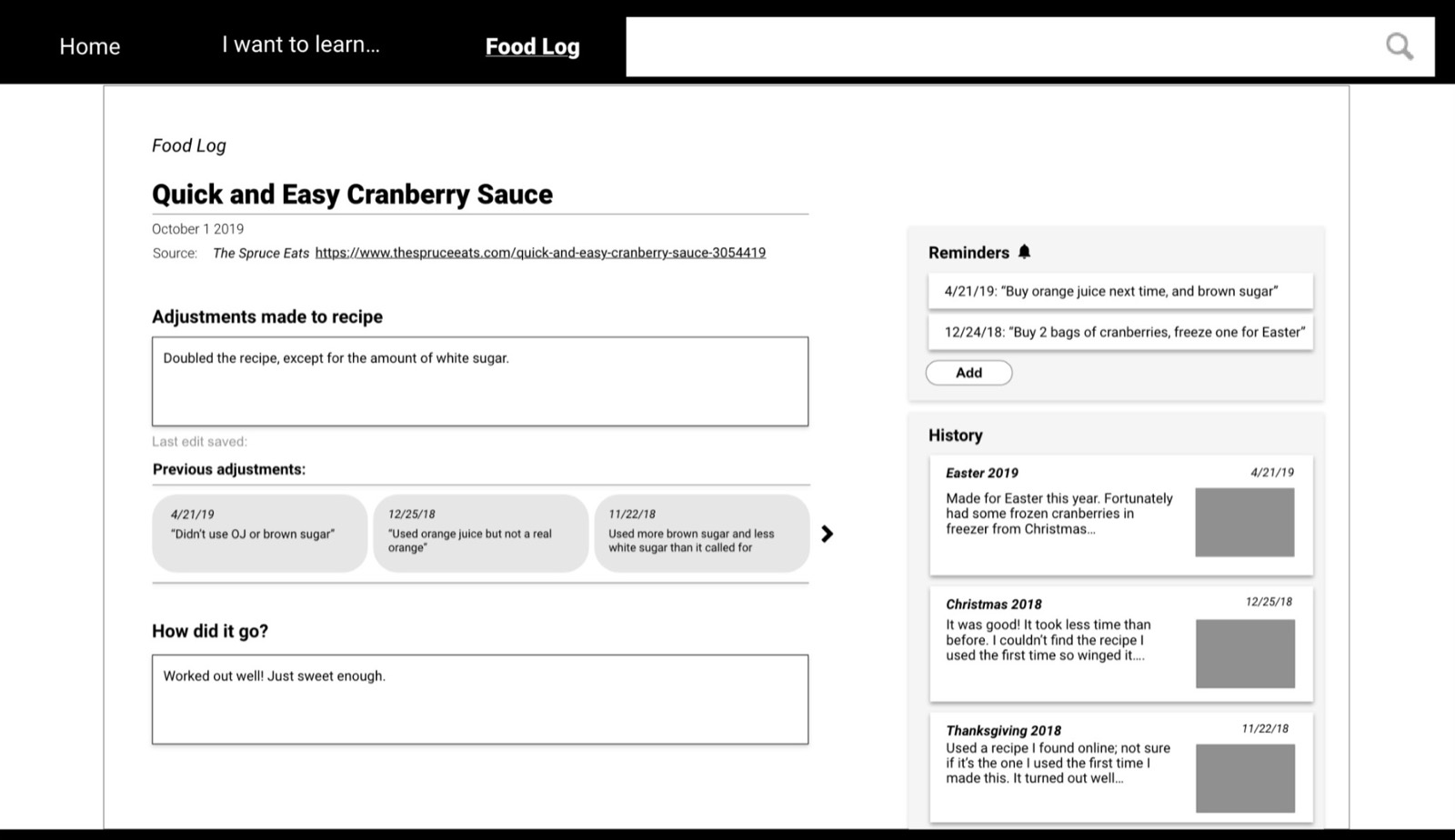
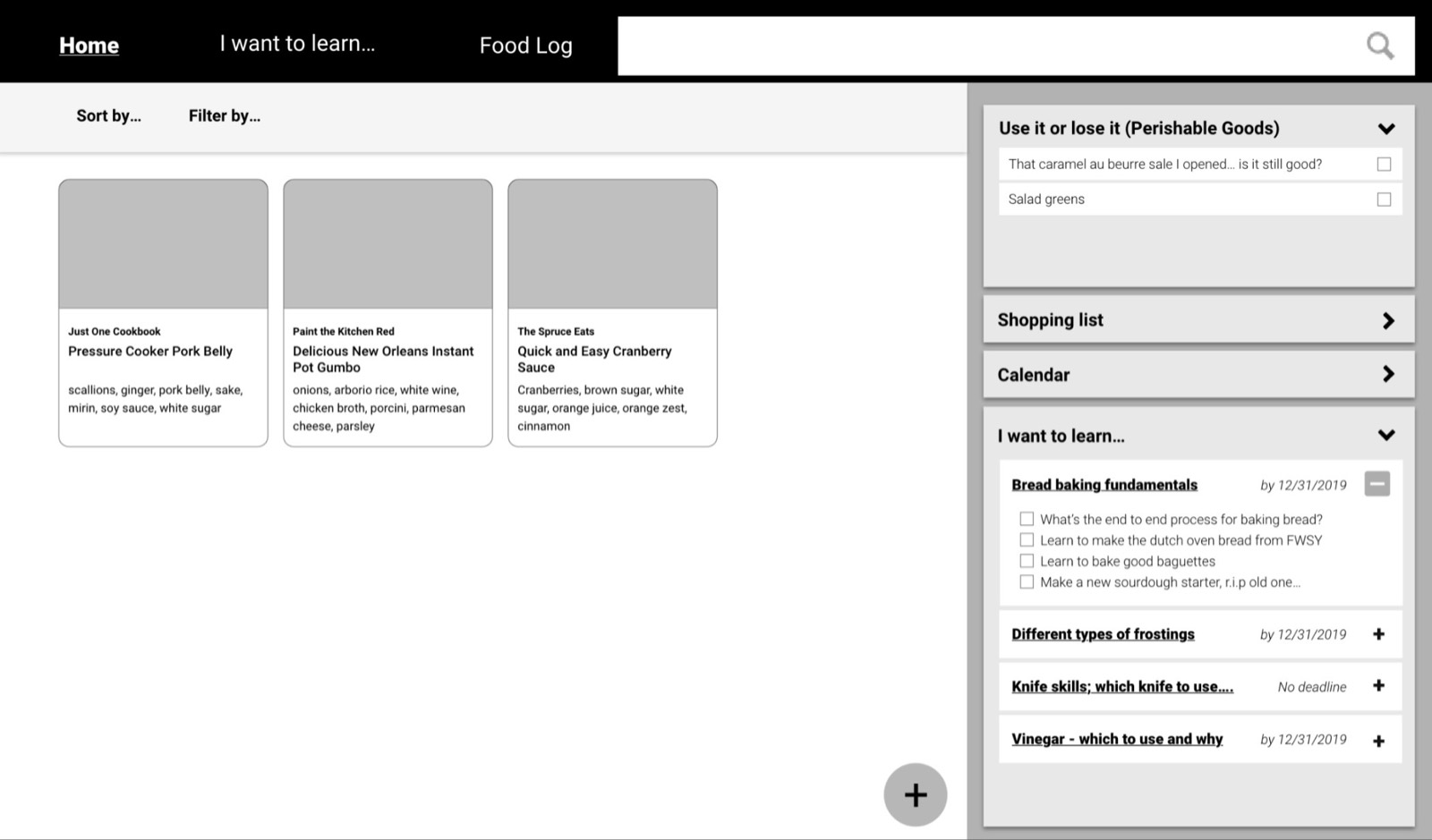
I wireframed three proposed product areas in Adobe XD. “I Want to Learn” would preserve self-defined goals and questions. The Food Log would record experiments and reflection. Home would keep accumulated knowledge visible and retrievable. At this stage, each screen was a hypothesis to test.
Wireframes · 3 screens
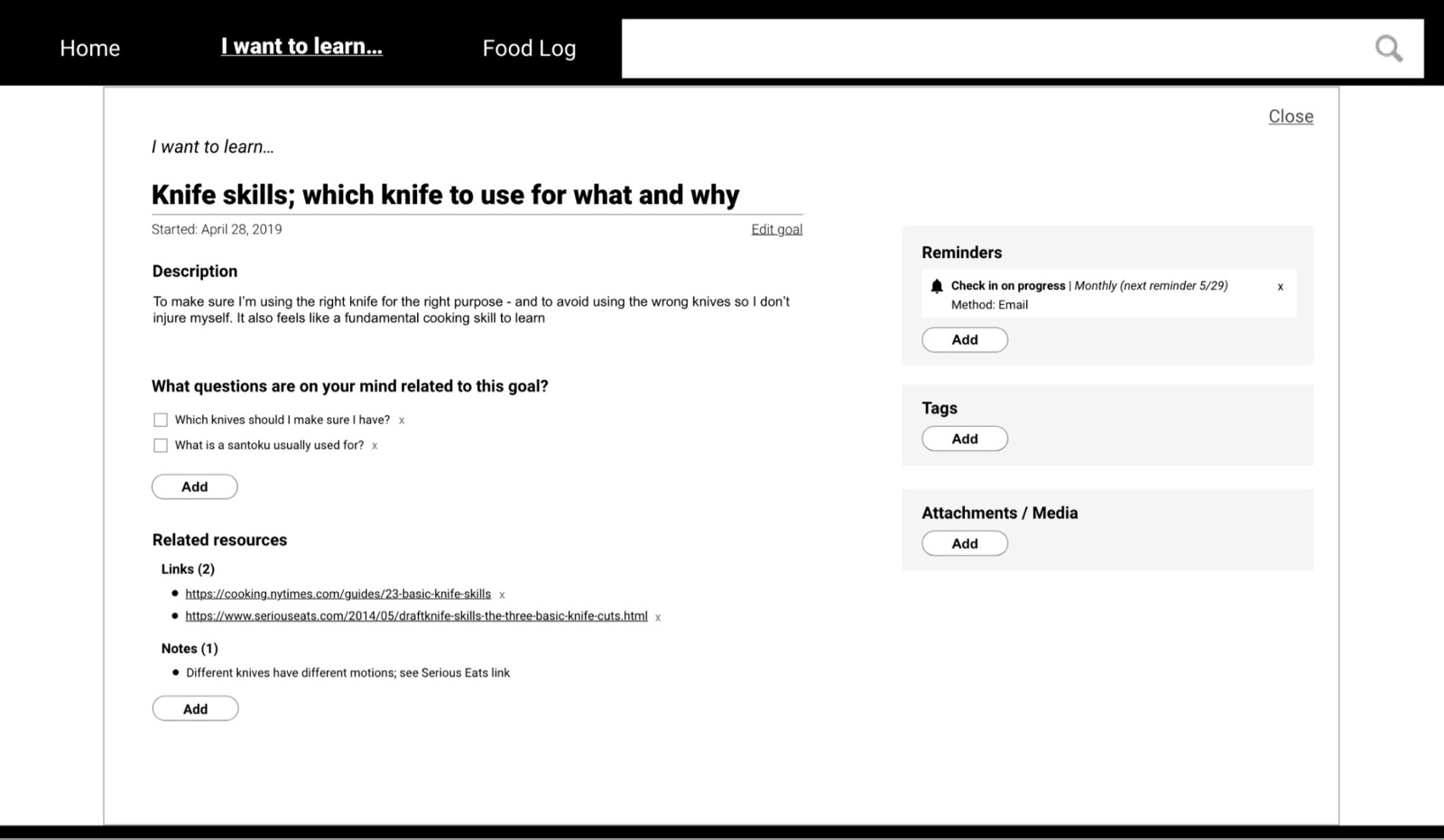
“I Want to Learn…”: user-defined skill goals. Knife skills appeared repeatedly in the exploratory research. Directly applies backwards design: start with the goal, then surface relevant content.
Selected wireframe feedback:
The decisive finding
Only 1 of 9 participants accurately described what “I Want to Learn” did from the isolated static screen. The screen did not provide enough context for participants to tell whether the system supplied instruction or whether the cook created and organized the content. Because self-directed skill development was central to the concept, this was not a visual-polish problem. The feature needed to explain itself through use.
Contextual interactive redesign
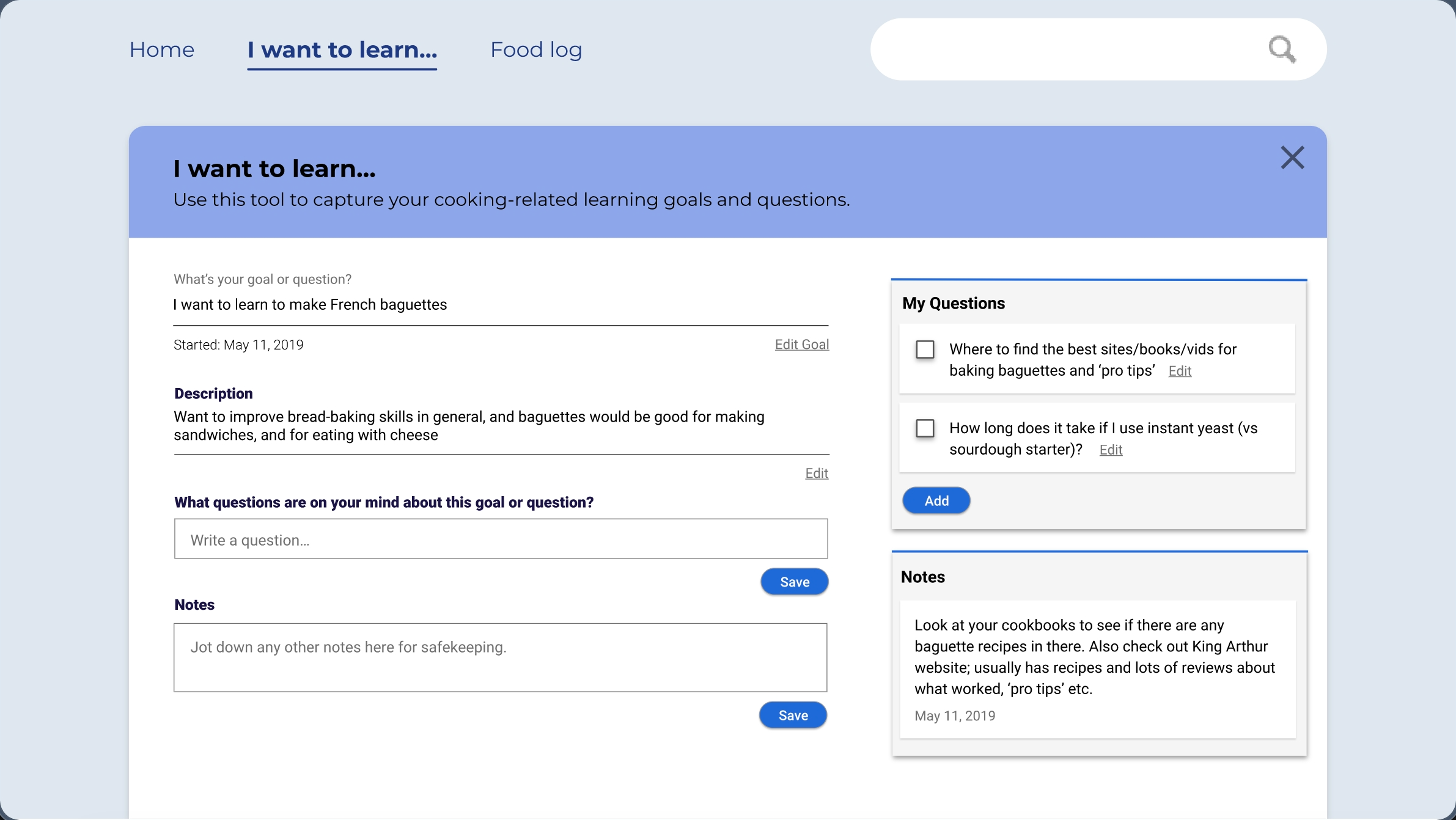
I redesigned the feature as an interactive Adobe XD simulation. Itintroduced the purpose before data entry, began with a concrete goal of learning to make French baguettes, and sequenced the cook’s goal, motivation, questions, and notes. Later frames demonstrated that saved questions and notes remained visible and findable rather than disappearing into another disconnected list.
Prototype flow · 8 frames
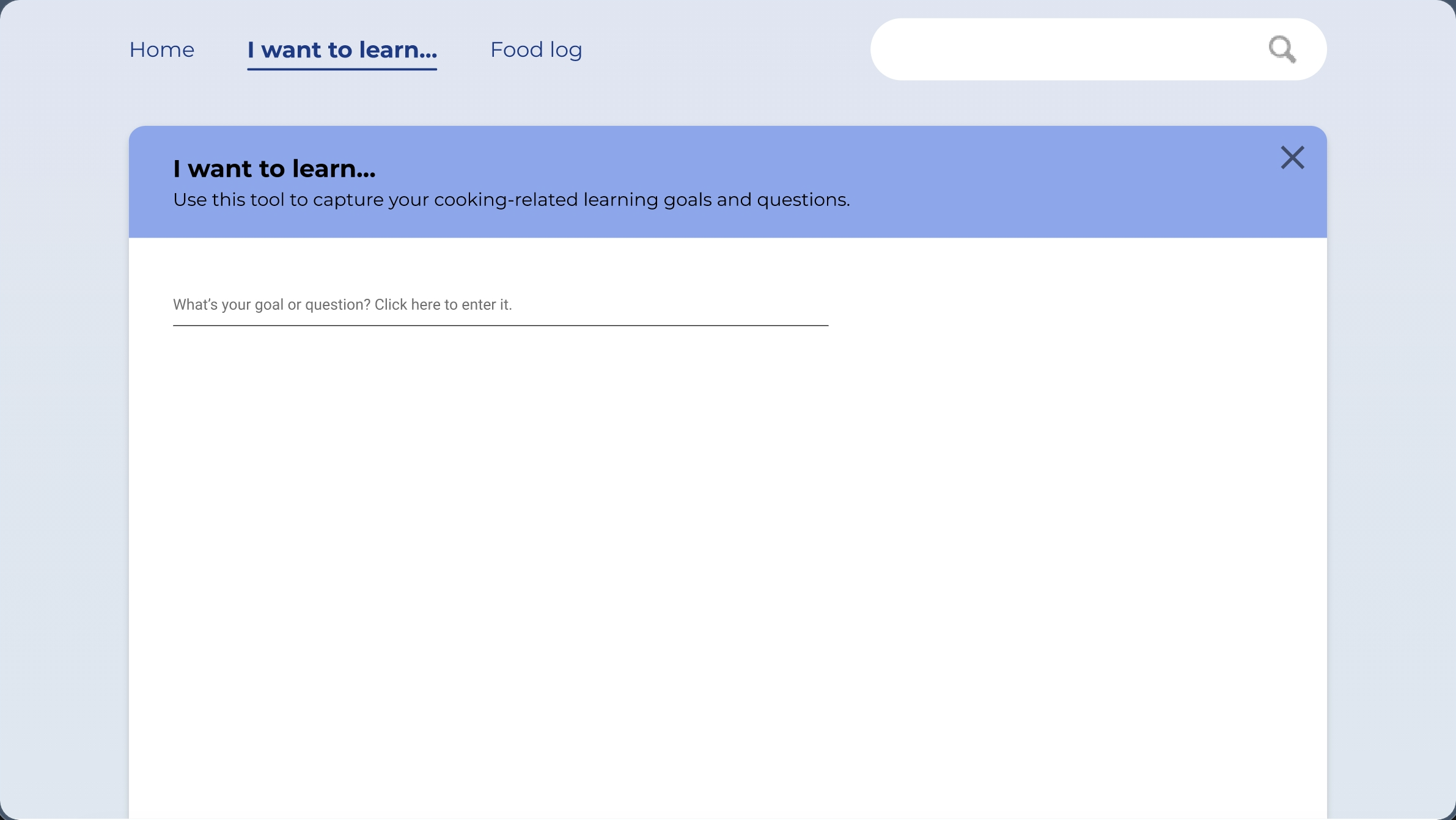
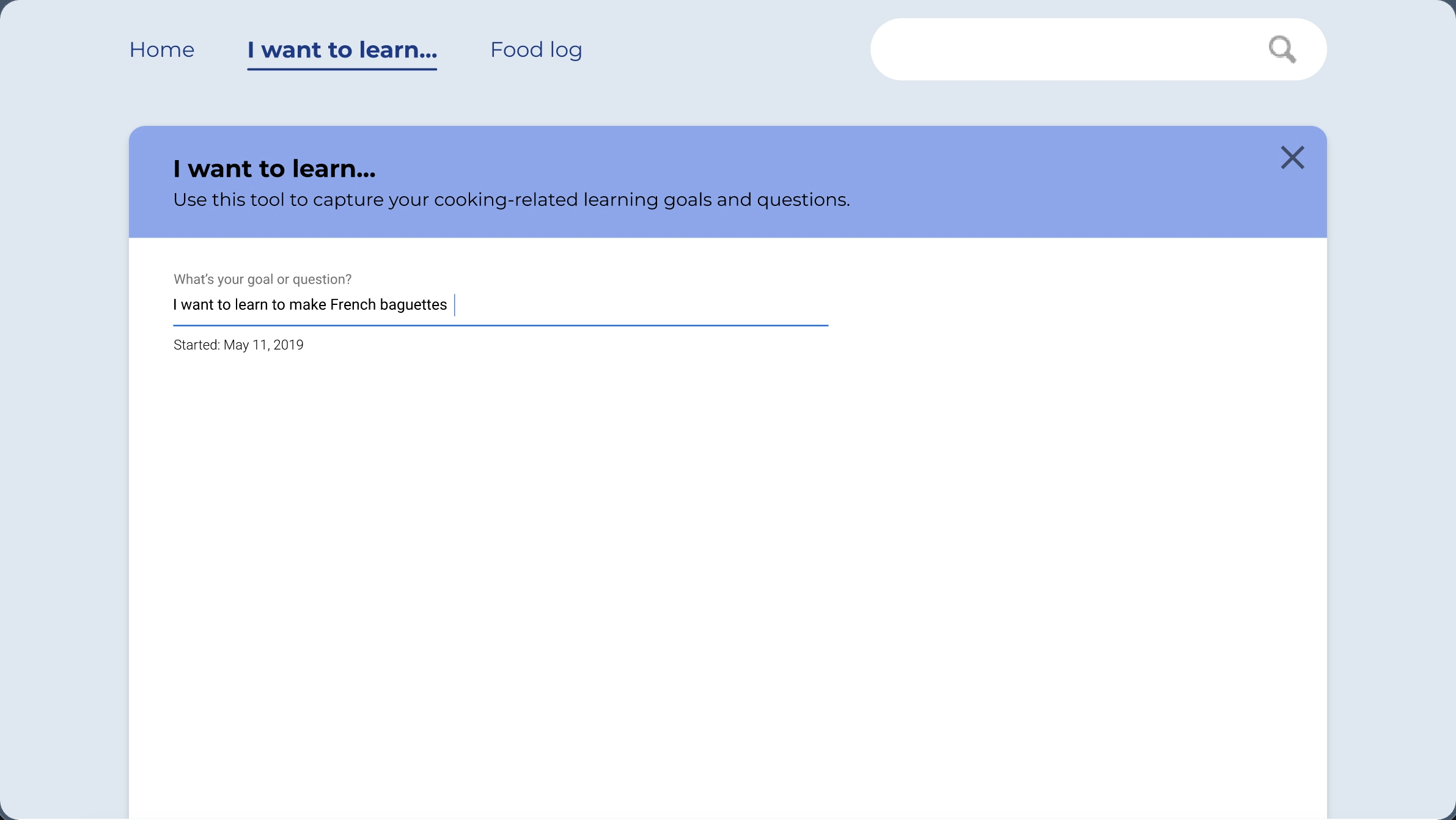
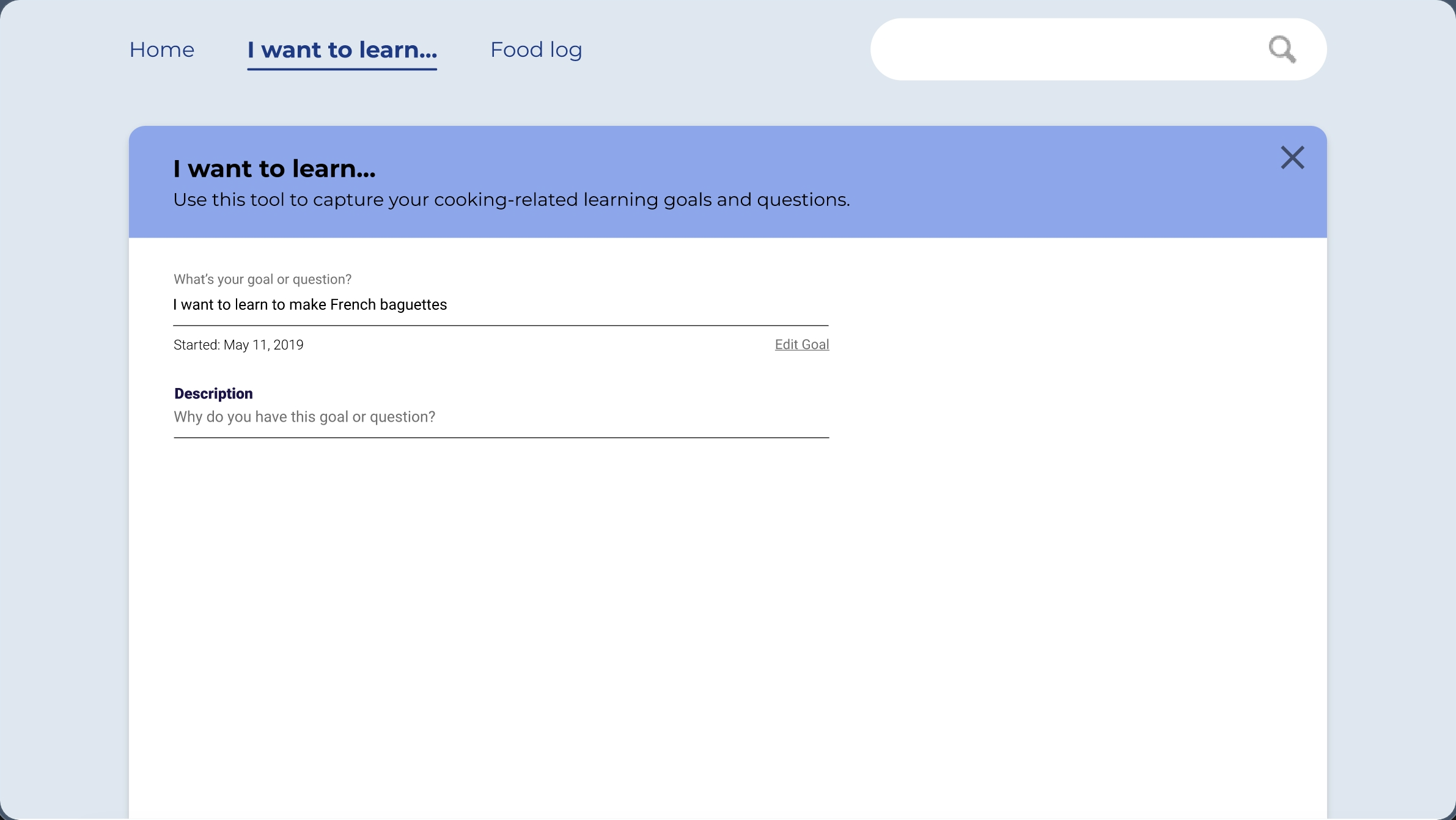
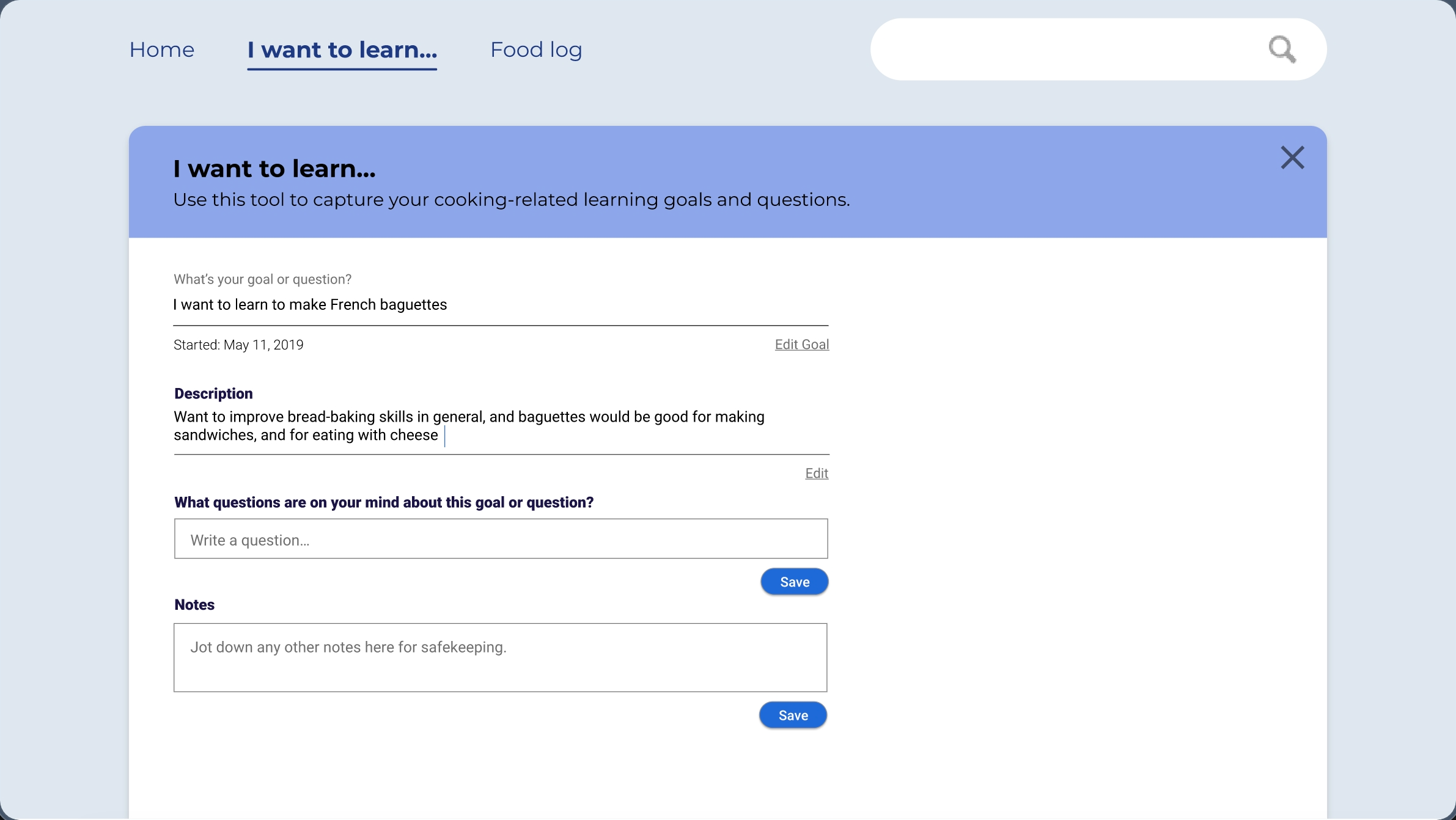
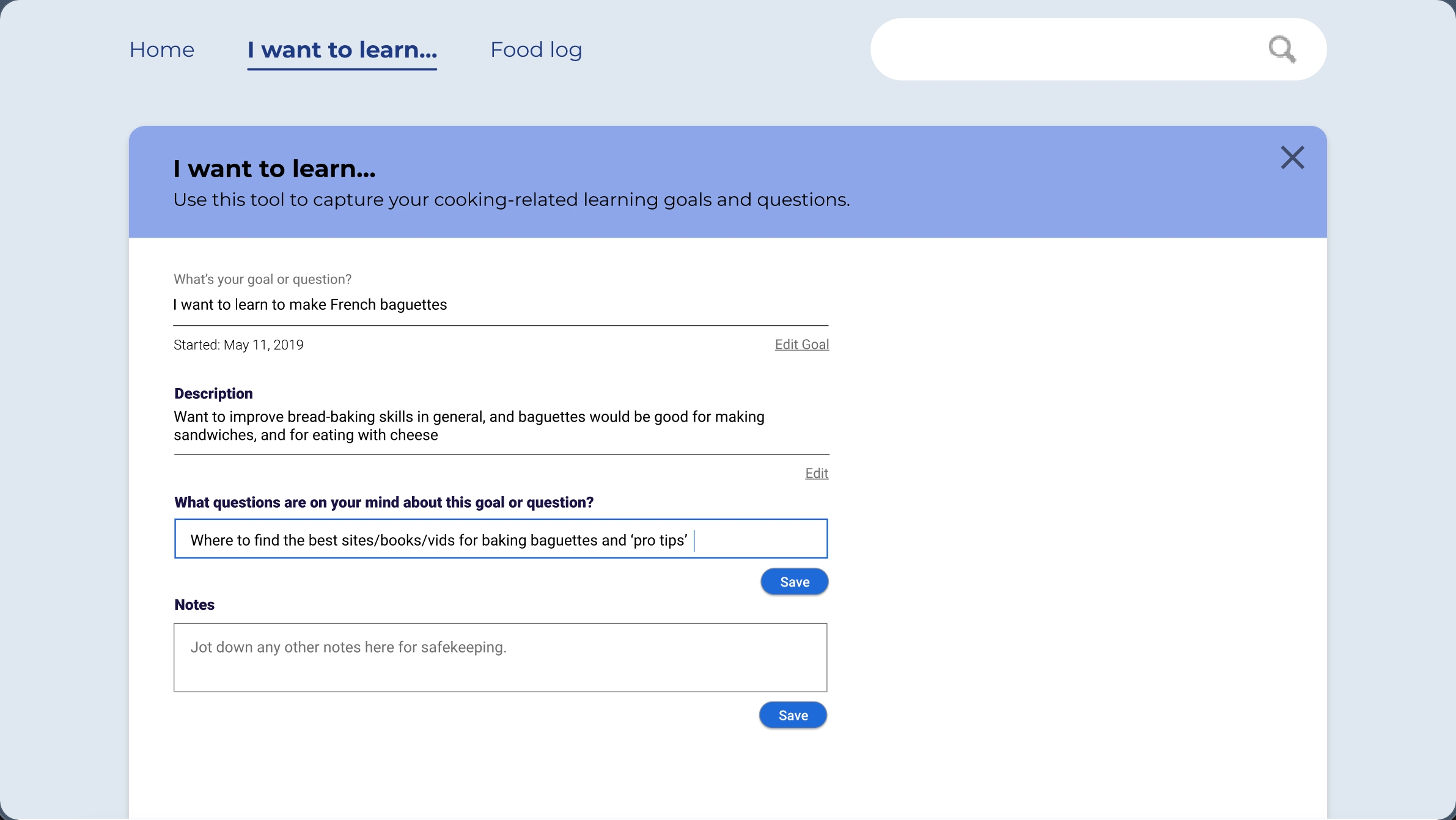
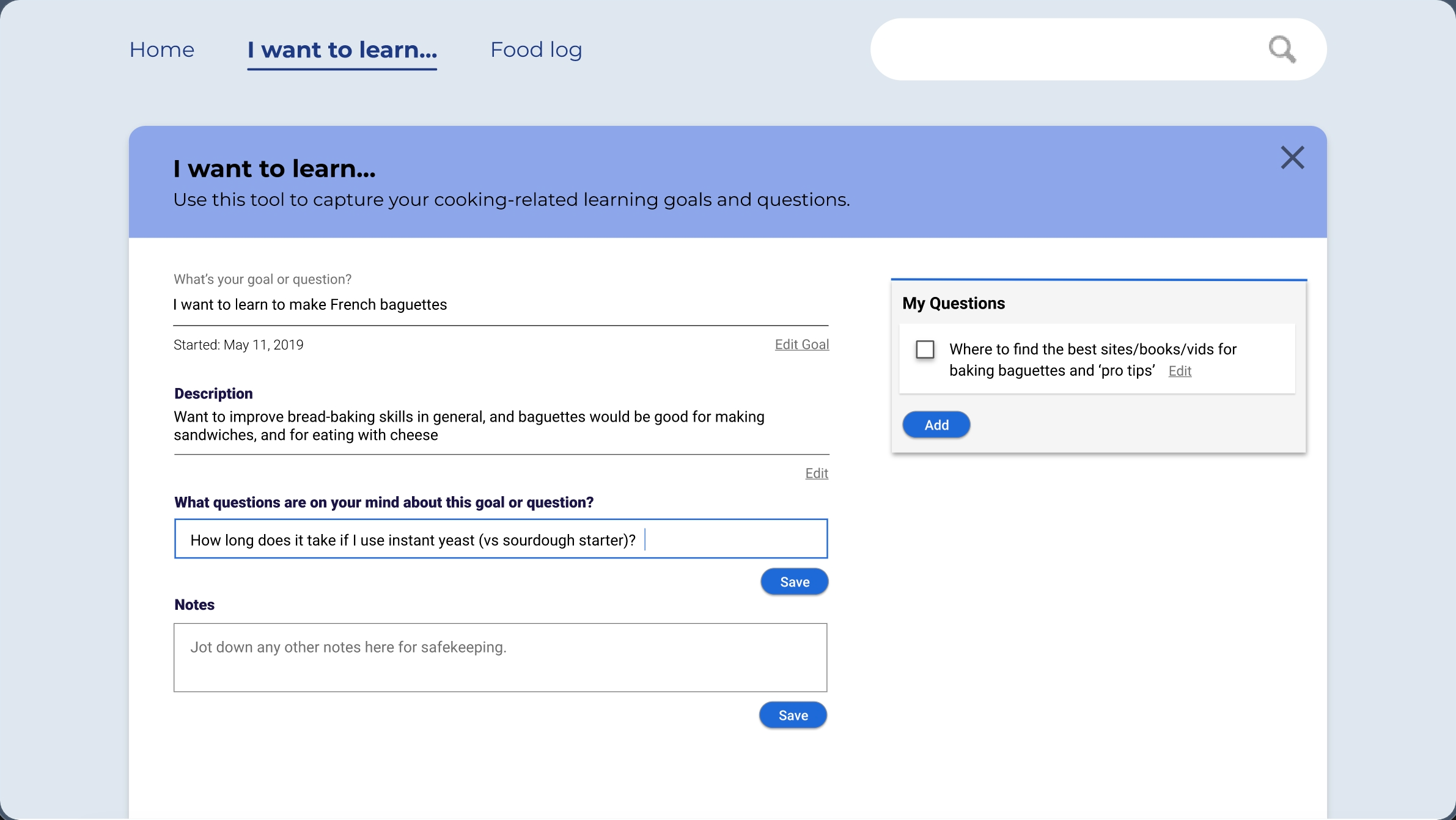
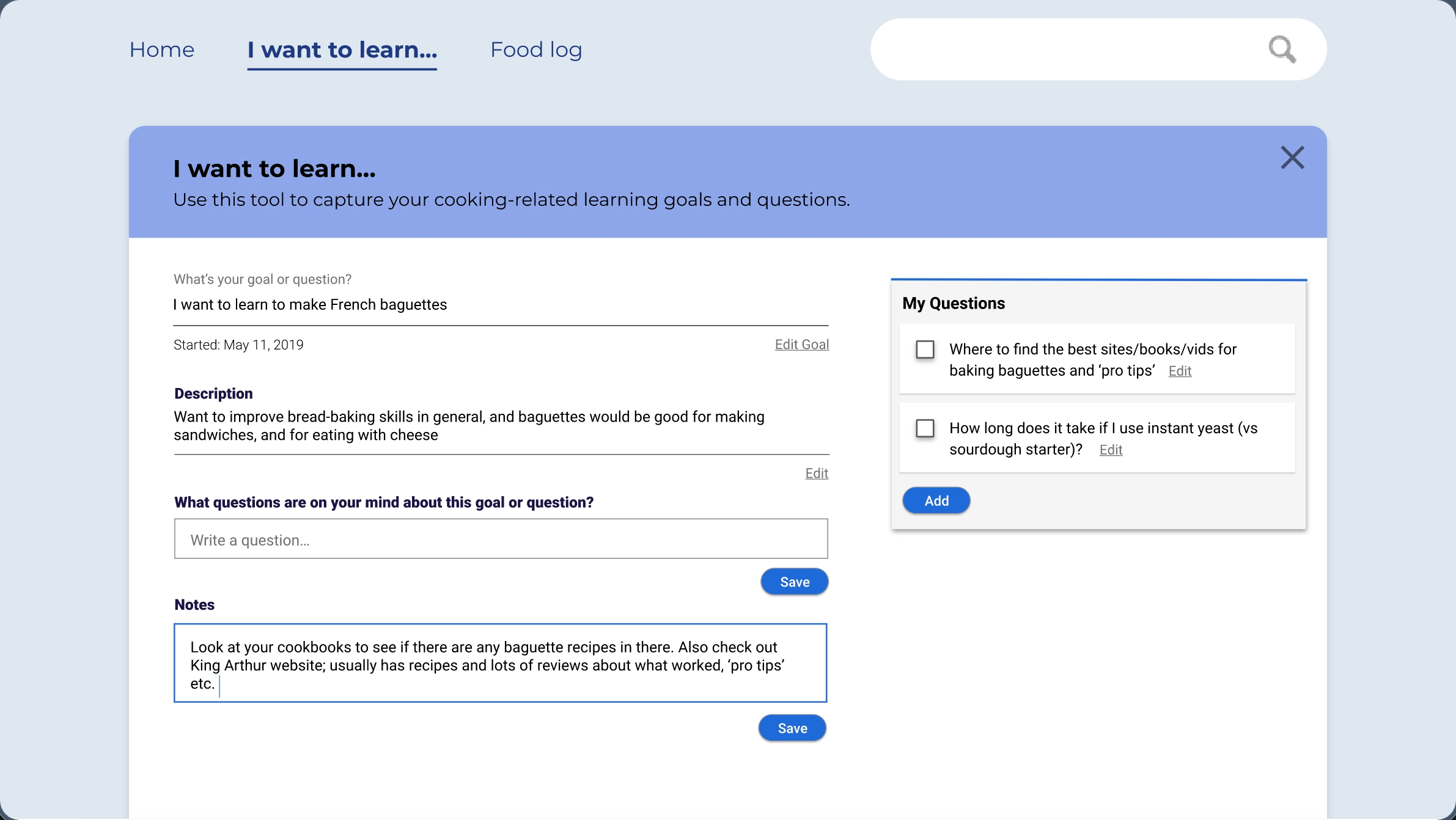
Applying backwards design: the user starts by naming their goal before the app asks anything else.
Interactive eight-frame simulation of the “I Want to Learn” flow · built for the second design-feedback round
What the second round established
Four participants from the earlier feedback group reviewed the interactive simulation through a prototype-linked survey. They described the revised flow as concise and easy to navigate, and one participant said it increased their confidence to pursue more cooking challenges. Requests for photos and video suggested useful supporting media.
What this demonstrates
01
Interviews reflected that cooking knowledge accumulated through experience, memory, recipes, and personal notes. That finding led to a Food Log for recording what changed, what happened, and what to remember next time.
02
Instead of imposing a curriculum, “I Want to Learn” began with the cook’s own goal, motivation, questions, and notes.
03
Only 1 of 9 participants understood “I Want to Learn” from the static wireframe. I responded by designing an eight-frame interactive flow that explained the feature through use.
04
Four returning participants found the revised flow clearer and easier to navigate. They also surfaced a larger unmet need: tracking progress across cooking attempts separated by weeks, months, or years.
Related work
Enterprise intranet information architecture (IA), user research, and interaction design for 45,000+ employees across global markets.
A 48-hour Kyoto hackathon concept combining tourist intercepts, contextual recommendations, and a physical prototype designed for spontaneous discovery.
A multilingual recall tool for learning IPA that lets the learner—not the app—decide what they know.